Preface
This guide will use Thonny as its IDE. If you don't already have a Python IDE, getting Thonny is greatly recommended. Visit here to download Thonny.
Contents
- Displaying a message to the user
- Display a variable to the user
- Getting data from the user
- Using variables in calculations
- 'if' and 'else' conditional statements
- 'elif' conditional statement
Displaying a message to the user
To display a message to the user, you must use the 'print' function.
This funtion is to be followed by ( ) and inside those brackets will be " " if you are displaying text.
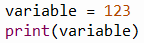
Displaying a variable to the user
To display a variable to the user, you must use the 'print' function again.
This funtion is to be followed by ( ) and inside those brackets you must place the name of your variable, without using " ".
Getting data from the user
To get data from the user you must use the 'input' function.
This funtion is preceded by the name of a variable, which in this example is 'usernumber' and the the '=' sign.
Then you place ( ) after the function with " " inside the ( ) and text inside the " ", this text will be displayed to the user.
Using variables in calculations
When calculating in Python, you use mathematical operators.
The basic operators are '+' for add, '-' for subtract, '*' for multiply and '/' for divide.
You can set a different variable to the result of a calculation.
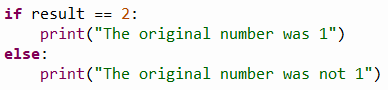
The 'if' and 'else' conditional statements
'if' and 'else' conditional statements can be used to check whether a certain condition applies and then act accordingly.
It is important that there is a ':' after the if statement is over.
When checking for two or more variables being equal, you must use '==' rather than '='.
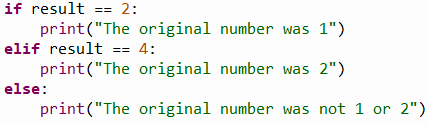
The 'elif' conditional statement
'elif' stands for 'else if' and is used following an 'if' statement without ending the current 'if' statement.
They act the same to 'if' statements but are better for efficiency and for complex 'if' statements.
'elif' statements act if the 'if' statement condition(s) is/are not met rather than when the 'if' statement is finished.
 Beginner in Python