Preface
This guide is meant to be used only if you already know the basics of Python, which you can find in Beginner in Python.
Contrary to the previous guide, this guide uses Replit as its IDE due to limitations in the machine used to code this site.
This only alters the visuals of the examples and not the functionality of the code.
Contents
- Code maintainability
- Data types
- Loops and iteration
- Arrays
- Subroutines/Functions
- Modules
Code maintainability
Code maintainability refers to making code easier to read and understand and also making unexpected errors easier to fix.
There are 4 main ways to make code more maintainable. Those are:
Comments - You can add a comment in Python by using a '#' before your comment. This can make some more complicated code easier to understand by providing a suitable explanation.
Modulisation (using modules and functions) - This will be explained later.
Indentation - Indentation is required in Python so it makes code more maintainable by default. Indents can be added using the TAB key.
Variable names - Having sensible and suitable variable names can help make code easier to follow through and understand the purpose of.
Data types
There are 4 key data types that variables can have in Python, with some others existing but being more advanced.
The 4 data types are:
String - A series of characters, also known as text.
Integer - A numerical value with no decimal values.
Float - A numerical value that does have or may have decimal values.
Boolean - A binary value, indicating ON and OFF states only, usually called TRUE and FALSE.
Loops and iteration
There are two basic types of iterative loops in Python.
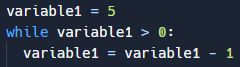
While loops are condition-controlled iteration, executing their code as long as a certain condition is met.
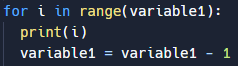
For loops are count-controlled interation, execution their code a certain amount of times before stopping.
':' must be placed after the statements otherwise the interpreter will return a SyntaxError.
Arrays
Arrays can be used to store multiple values in one variable.
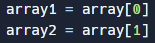
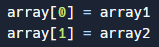
To access a specific part of an array you must specify the array and then the position of the value in '[ ]'.
It is important to note that the first value of an array has the position '0' and not '1'.
There are a number of parameters you can run alongside an array. These include:
- append() - Adds an element at the end of the current list.
- clear() - Removes all the elements in the list.
- count() - Returns the amount of elements in the current list.
- insert() - Adds an element at the specified position.
- pop() - Removes an element from the specified position.
- remove() - Removes the first element with the specified value.
Subroutines/Functions
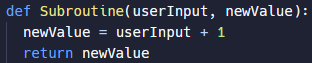
Subroutines, which are also known interchangably as Functions, are pieces of code that are defined near the beginning of a program and are useful when the same piece of code needs to be ran multiple times.
Using subroutines to make code more maintainable is called modulisation.
Subroutines can also be passed variables when they are being executed, use those variables within their code, and then return variables back to the main piece of code.
When subroutines are used to make code more readable and maintainable, the process is called 'Modulisation'.
Modules
In complicated programs many subroutines may need to be used.
To improve code readability, maintainabilty and efficiency, these subroutines can be stored in a seperate file to the code being executed.
To add these subroutines to the executed program, you must use the 'import' statement followed by the name of the Python file containing the subroutines, called the module.
After the module is imported, you can run subroutines from it by using its name followed by '.' then the name of the subroutine and the parameters as normal.
When importing a module, you can also follow the statement with 'as' to change what prefix you need to use to reference the module rather than the original name.
 Intermediate in Python